
Check an MCP server before changing its configuration
An MCP entry in a config file is not proof that a server is reachable, authenticated or useful. Use Sessions Viewer to see which agents read it and preview changes, then verify runtime connectivity in the intended agent.
1. Establish where it is configured
Open the tool manager and select MCP servers. Pick the entry and inspect its Active in locations, file paths, command/URL and agent ownership. A compatibility read matters: Grok can read Claude's config, so changing a shared entry can affect both.
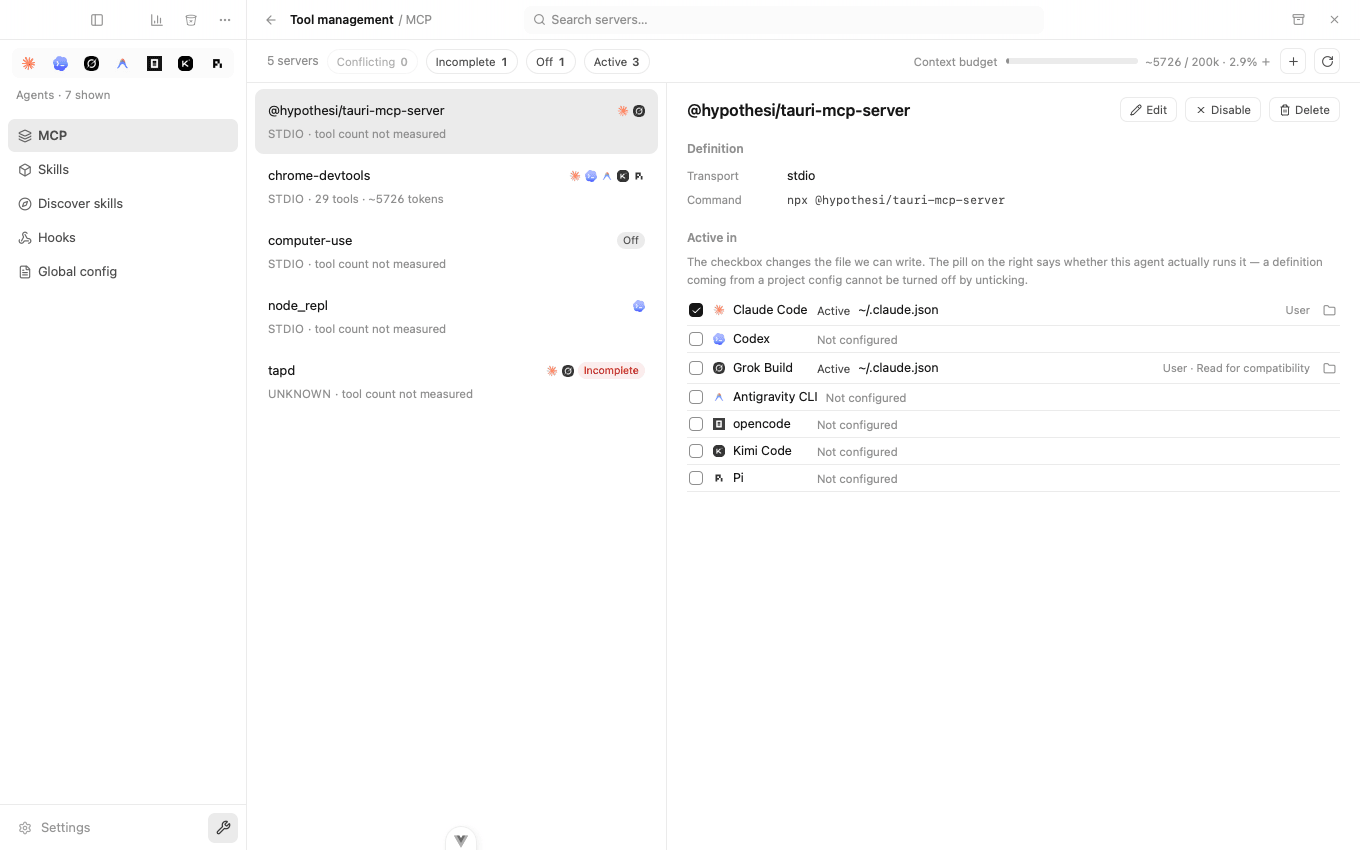
Distinguish a direct entry from a config inherited for compatibility before removing or copying it. JSON and TOML syntax differ; use the preview to see the target format instead of pasting the same block everywhere.
2. Interpret the context estimate
The estimate uses locally available tool definitions from Pi and Antigravity caches. Inspection does not start a server to measure it. Tokens are approximated at 4 characters per token, not counted using your selected model's tokenizer. Missing cache data is unmeasured, not zero tools or free context.
This measures tool-definition overhead, not server responses, future tool calls or exact billable usage. Same-named servers can share the cache lookup, so verify the actual server identity before making budget decisions.
3. Preview one focused change
Choose enable/disable, edit, copy or remove for the intended agent. Before confirming, inspect:
- Exact target file and agent scope, including compatibility readers.
- Before/after values and whether unrelated entries stay untouched.
- Command, executable path, environment references and URL.
- Any backup and conflict indication. If the file changed since inspection, refresh and review again rather than forcing an overwrite.
Secrets may be masked in the list but can appear in detail/previews when revealed. Review screenshots and bundles before sharing. Do not put real keys in public examples.
4. Verify runtime separately
Reload the target agent as required. Check server startup, authentication and available tools there. A saved config does not confirm network reachability, command dependencies, protocol compatibility or permissions.
If it fails, record the app/agent versions and a redacted command/config shape; check executable availability, project/global scope, environment and service access. Do not paste tokens or a full private config into an issue. A configuration bundle is for selected setup sharing, not a substitute for a full secret-bearing backup.
For screenshots and configuration features, see MCP management. For skills, see reuse and link repair. Hooks are separate: a hook “dry-run” executes the configured command and is not a security sandbox.
Evidence: 0.6.0 source review on 2026-10-05, MCP inspection/cache estimates and configuration writes. No real MCP connection or CLI-version test was performed for this guide. See privacy.